Showing posts with label map. Show all posts

Sunday, July 30, 2017

Stitched Together

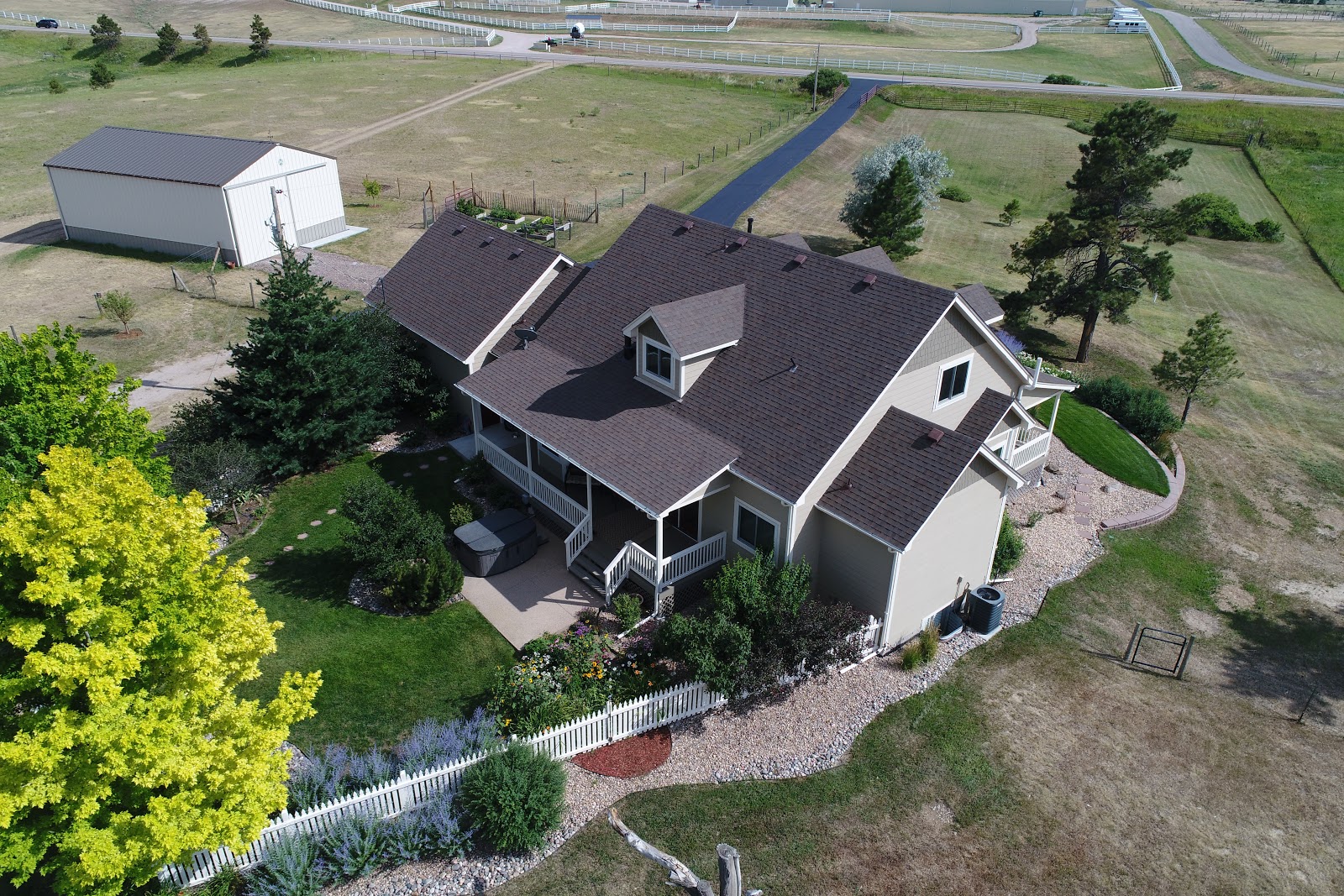
When our son took the photos using the drone he accomplished three things. He took some still images of the house, he had the drone circle the house and take video footage, and he "mapped" the property, taking photos shooting straight down while the drone followed a regular path going back and forth on our property. The drone was programmed to take 116 shots, and later my son stitched those photos together to create an aerial image of our property.

Click on this link to see the image.

If you view the image online, instead of simply looking at the screen shot I have posted, you can see many details with amazing clarity. I was surprised by the tracks left from the truck when it removed trees in May. Those tracks can be seen on the left center portion of the property. It shows how fragile our Colorado high desert land is.


It saddened me to see the "road" through the pasture. This was created by traffic during our estate sale. Our driveway was too narrow for two-way traffic so we had no option but to cut the fence and route traffic through the property. We have used the drag harrow to try to "rough up" the tracks, and we have spread some dry-land prairie grass seed mix, but it will take years to recover, if it ever does.

You can zoom in on my vegetable garden raised beds, the green rectangle just south and west of the house. I was tickled by the row of bright green lettuce. Do you see the red Zinnia blooming? I had some packets of Zinnia seeds and planted them to fill in here and there in the vegetable garden. They are beginning to bloom and they look great!


Oh, and look, just east of the garden you can see the drag harrow and the scuffed up earth behind it!

From this view our land looks like it is just dirt, but looking at it from ground level it does have a lot of plant life!


And, speaking of plant life, if you zoom in by the house you can see the purple-blue clumps of Russian Sage, and in the flower garden in back of the house I can see the wild sun flowers, some day lilies, my purple Monardia, and even my Echinacea. Outside of the picket fence I cracked up when I saw the hose. At first I thought there was a line drawn on the map for some reason!


And then there is my not-so-round pen! When I set the pen up I used a rope attached to a metal rod to "draw" a perfect circle. This past fall Mr. Dreamy installed a weather station on one of the fence posts of the pasture. In order to keep curious horses from "playing" with the weather station, I moved two panels to block off the weather station, and closed up the round pen. I bet you can see from where those panels were taken! I can!

If you know where to look along the fence line one can even see my bird houses. I have over a half-dozen to encourage our bluebirds. This year we had a few couples that managed to fight off the swallows and maintain ownership of their houses. It has been wonderful to see bluebird families in the yard. And, it has been fun to have this birds-eye view of our property.


https://www.mapsmadeeasy.com/maps/public/1332c3798b6e47e5bf2d4a43d042afb1

Tuesday, July 25, 2017

Sky View

Our son, David, works for a commercial landscape company. They use a drone to map locations for their jobs and to get images of the properties where they have projects. Our son is a drone pilot for the company. He uses a variety of software to plan the drone flight and to map the results. He can program a flight from takeoff to landing and once programmed, the drone does everything on its own. Or, he can fly the drone manually, and by looking on an iPhone screen attached to the controller, he can tell the camera to take a picture. Once the flight is complete the data he has collected connects with other software and he can create maps and diagrams. Fascinating!
The other day he stopped by with the drone and took photos and videos. I was in awe of the entire process. I was also in awe of how adept my son is with all of this!
First he programmed a circular flight around the buildings on the property. He uses coordinates to tell the drone where to fly. He can tell it at what altitude to fly and how fast. Here he is showing me on the iPhone screen that manages the flight, what he has preprogrammed.


The yellow circle is the path the drone will fly. 


David takes the drone out of the backpack,


and attaches the propellers. 


Within minutes the drone lifts off.


Up, up and away!


This is a link to the video the camera recorded on the flight. 
The file is too large to upload to Blogger. 


Next, our son took over the controls, and while looking at the iPhone screen, selected individual photos to shoot. We Dreamers were enthralled with what he was doing. It seemed strange to sit on the porch and see images on the iPhone screen of what the drone was seeing, even on the other side of the house. 


And, here is what the drone saw:


The last program our son used required that the drone fly in a pattern, back and forth, from one end of our property to the other. The drone took shots periodically, 116 in all. David will "stitch" the pictures together with other software and create an overhead view of our property.

Here are two of the 116 shots. It will be very interesting to see the finished "map".


I enjoyed seeing the pictures of our property. I have always been fascinated by Google satellite shots, but these allow one to zoom in a bit more. I also loved seeing how at home my son is with the software and the drone. He has a unique skill set!


Friday, March 29, 2013

By The Numbers: Home

HOME!

  • 7270:   miles Mr. Dreamy drove the RV on the trip
  • 782:   gallons of fuel pumped into the RV (ouch)
  • 90:   number of days we were 'on the road'
  • 57:   gallons of propane used for heating and cooking
  • 24:   campgrounds visited
  • 21:   most days spent at one park (tie: Ft. Clinch State Park at Fernandina Beach, FL and Palm Creek RV Resort in Mesa Grande, AZ)
  • 10:   states visited with the RV (but we visited two additional states in the car)
  • 8:   number of feet the motorhome was driven by Dreaming on this trip (4 feet forward and 4 feet backward maneuvering in a camp site)

The dogs were thrilled to be home. They went right to work telling the bunnies who was boss. They chased bunnies for at least an hour before their tongues were dragging! No bunnies were harmed in the pursuit.

Sunday, September 2, 2012

Motorhome Trek and New Followers

I'd like to welcome two new followers:

  • The first is Carrot Top. She writes a blog called, Little Bay Horse, and she lives on the other side of the world from me, in Australia. As the snow begins to fly here, I just might consider visiting her! What d'ya think? Do you have a guest room... for a few months?!
  • My second new friend to welcome is Becky. She writes Becky Povich: Writer, Humorist, Bliss Follower. Becky and I met through the Saturday Centus. A quick trip through her blog will have you LOL! BTW, Becky, I have ugly, crookedy toes, too!
Thanks so much for taking the time to read what I write, now and then, and to become a follower. I appreciate it very much.

I had a few folks who rose to the challenge to try to determine our route with the new RV. Sarah came closest, with only one error - she had the first point on the map as Decatur, IN. In fact, it was Decatur, MI. We began the trek somewhere north of that - in realty that point was Wayland, MI.

This is the McDonald's in Wayland. 
The decor is very interesting - and a refreshing change from most Mickey D's.

As we decided on the specifications for the motorhome we wanted, we stumbled on a listing for the perfect unit at General RV. They had exactly what we wanted at a fraction of the price of what we had been seeing locally. In fact, the price of this new model on their lot was considerably less than a used RV we looked at in our home state. We reached one of those see-saw moments; do we? or don't we? We did! We arrived in Michigan and after a day and a half of fine tuning and last-minute fix-ups, we began the trek home.

Interesting bridge sculpture on the Iowa/Nebraska State Line

Along the way we saw signs for the following towns as we traveled on I-94, I-80, and I-76:

Decatur, MI
LaGrange, IN
Geneseo, IL
Rochester, IL
York, IL
Williamsburg, IA
Corning, IA
Aurora, NE
Lexington, NE
Hudson, CO
Parker, CO


Sarah gets a ride and dinner on the RV the next time we are near her home! Oh, that will be great fun! But no, Sarah, sadly we will not drive in Seattle traffic to pick you up driving the RV. We'll have to make other arrangements!

Wednesday, June 20, 2012

Wednesday Evening What's It

What's it?


*


*


*


*


*


*


Have you figured it out?
Perhaps it would help if you know that I made it...
whatever it is.

*


*


*


*


*

Although it looks like marker,
that's not what I used.
Oh, and it isn't a face tipped awkwardly.
And, it's not a strawberry without the black dots.
I'm not much of an artist, 
but I could at least draw a face....or a strawberry.
... I think!

*


*


*


*


*

Here's a hint.
I'll add some more details
and make it a bit larger.


The green and red should provide another clue.

Now do you know what it is?
Have you figured it out?

*


*

Here's the answer:

This is the path I walked during a therapeutic riding class. 
It was actually a physical therapy session with a 6 year old child.
We started at the green point and walked around.
We did some large figure eights.
We did some 'crazy walking' with 
abrupt turns, stops and starts,
and we did some work down each of the long sides of the arena.
The only error in the map is that the red 'stop' sign 
should have been in the barn.
You can see the path we took to get there.
Once we were in the barn our rider dismounted,
said "Thank you" to the volunteers,
and patted the horse, "Good-bye".

Other details of this lesson include:

Duration: 44 minutes:16 seconds
Average Speed: 1.61 mph
Maximum Speed: 2.90 mph (we trotted a bit)
Calories Burned: 120

I have often tried to guess how many miles I walk in a therapeutic riding class. A few days ago I finally found my pedometer, but sadly, it no longer worked. I thought about getting a new one and then had an "Ah-hah" moment. I bet there's an app for this! I looked online and found a number of pedometers. I downloaded three apps to try, all free. The one I used for this map is called Dog Walk. This program keeps track of your walks with or without your dog. You can save the maps, share them with friends and compare them. Tucker has told me he'd like me to get a bit more serious about using it....with him!

Another app I decided to try is called Walk Star. It keeps track of your steps each day, encouraging you to walk a minimum of 10,000 steps. It also keeps track of the total distance you've walked, the calories you have burned and your speed. I've only used it a few times and I've never made it to 10,000 steps. Well, actually, I probably have taken that many steps, but I kept forgetting to leave my phone on, so during part of each day my steps weren't logged.

The last app is free pedometer marketed by Viaden. They have some free apps and others that you can purchase. I haven't tried using this app yet, but it seems to log the same things as the other programs and it graphs your speed. 

I really like the Dog Walk app. I can think of many uses. If I'm out trail riding, I could track my trail and find out the distance. It would also be interesting to clock the speed of a ride, especially if you are preparing for competition. 

Did you guess what my drawing was before I told you? 
If not, what did you think it might be?


Santa Fe

We had a beautiful day in Santa Fe.  We made a quick stop at the Cathedral of St Francis of Assisi.  It was awe inspiring to see "La Co...